
|
Getting your Trinity Audio player ready...
|
Tracking assignment grades is important for success in class. Students who know their grades can plan better. They know which work needs more focus. They can guess their final grade and set simple goals. Tracking grades helps reduce stress and avoids surprises at the end.
Many students struggle with grade calculations. The math can feel confusing. Different classes use different systems. Some use points while others use percentages. Weighted grades add another layer of complexity. Without proper tools, students might not know where they stand until report cards arrive.
This guide will teach you everything about using grade calculators effectively. You’ll learn what an assignment grade calculator is and how it works. You’ll discover simple methods to track progress. You’ll understand point systems and weighted grades. By the end, calculating grades will feel natural and easy.
What is an Assignment Grade Calculator?
An assignment grade calculator is a tool that helps students figure out their current and future grades. It does the math automatically. Students enter their assignment scores and point values. The calculator shows the current grade instantly. It can also predict what future scores are needed to reach grade goals.
In student grading scenarios, these calculators are like having a personal grade manager. They provide clear information about academic standing. No more guessing or worrying about grades. Everything becomes transparent and manageable.
These calculators help track progress throughout the semester. After each assignment, students can update their information. They see immediately how each grade affects the overall result. This ongoing tracking helps identify problems early. If a grade starts slipping, students can take action while there’s still time to improve.

Benefits of using grade calculator tools include saving time, reducing errors, and lowering stress. Manual calculations take several minutes and mistakes happen easily. Calculators give accurate answers in seconds. Students gain confidence knowing exactly where they stand. This confidence helps them focus on learning instead of worrying about grades.
Understanding Final Grade Calculator Points
A final grade calculator points system works by adding up all points earned throughout a semester. Each assignment has a point value. A quiz might be worth 20 points. A test could be 100 points. A project might be 50 points. The calculator adds all earned points and divides by all possible points.
The total points system works simply. Imagine a class with 500 total points available. A student earns 425 points across all assignments. The calculation is 425 ÷ 500 = 0.85. This equals 85%, which is typically a B grade.
Converting points to percentages follows one formula every time: (Earned Points ÷ Total Points) × 100. This formula works whether there are 100 total points or 1,000 total points. The percentage always shows what portion of possible points was earned.
Example conversion:
- Quiz 1: 18 out of 20 points
- Quiz 2: 17 out of 20 points
- Test: 85 out of 100 points
- Total: 120 out of 140 points
- Percentage: 120 ÷ 140 = 0.857 = 85.7%
Using a final grade calculator points tool makes this process instant. Enter each assignment’s points and the calculator handles all the math automatically.
Mastering the Assignment Weight Calculator
An assignment weight calculator handles situations where different assignment types count for different percentages of the final grade. This weighting reflects the importance and difficulty of various assignments.
Common weighting structures in schools include:
- Tests: 40-50% of final grade
- Projects: 20-30% of final grade
- Homework: 15-20% of final grade
- Quizzes: 10-15% of final grade
- Participation: 5-10% of final grade
These percentages must add up to 100%. Teachers decide weights based on what they value most in their courses.
Impact on final grades can be significant. A student might have perfect homework (100%) and decent tests (80%). If homework counts 20% and tests count 50%, the calculation is:
- Homework: 100 × 0.20 = 20 points
- Tests: 80 × 0.50 = 40 points
- (Plus other categories to reach 100%)

The weighted system means test performance matters more than homework in this example. Students need to understand these weights to prioritize their study time effectively.
Learning to Calculate Weighted Assignments
Understanding how to calculate weighted assignments requires knowing three simple steps.
Step 1: Multiply each score by its weight. Take each category’s average percentage. Multiply it by the weight (as a decimal). If tests average 85% and count for 50%, calculate: 85 × 0.50 = 42.5.
Step 2: Add weighted scores together. After calculating weighted scores for all categories, add them up. For example:
- Tests (50%): 85 × 0.50 = 42.5
- Homework (30%): 95 × 0.30 = 28.5
- Projects (20%): 88 × 0.20 = 17.6
- Sum: 42.5 + 28.5 + 17.6 = 88.6
Step 3: Divide by total weight. If all weights add up to 100% (or 1.0), this step is already done. The sum from step 2 is the final grade. In our example, 88.6% is the final weighted grade.
A weighted assignment calculator automates these three steps. Students just enter scores and weights. The calculator does all multiplication, addition, and division instantly. This eliminates errors and saves time.
Using an Assignments Calculator for Multiple Tasks
An assignments calculator helps students manage various types of schoolwork in one place.
Homework assignments often come frequently but count for less than major assessments. A calculator can track all homework scores, show the homework category average, and apply the proper weight to this category. Even if there are 30 homework assignments, the calculator handles them all.
Projects and presentations typically count more than homework but happen less often. These might be worth 50-100 points each. The calculator tracks these major grades separately from daily work. This organization helps students see how each component contributes to the final grade.

Organized grade tracking becomes possible when using an assignments calculator. Instead of scattered papers or confusing spreadsheets, everything stays in one tool. Students can sort assignments by type, date, or point value. They can see which categories need improvement. This clarity leads to better planning and stronger academic performance.
How to Calculate Grade in Class
Learning how to calculate grade in class starts with understanding the basic three-step process.
Step 1: Add all earned points. Go through every graded assignment, quiz, test, and project. Write down points earned for each. Add them all together. For example: 18 + 17 + 85 + 42 + 95 + 88 = 345 total earned points.
Step 2: Divide by total possible points. Add up the maximum points possible for all those same assignments. If the assignments above were worth 20 + 20 + 100 + 50 + 100 + 100 = 390 possible points, divide: 345 ÷ 390 = 0.8846.
Step 3: Multiply by 100 for percentage. Take the decimal from step 2 and multiply by 100: 0.8846 × 100 = 88.46%. This is the current grade in the class. Most teachers would round this to 88%.
This same process works whether tracking just a few assignments or an entire semester of work. The formula never changes. To calculate grade in class at any time, just include all assignments completed so far.
Advanced Guide: How to Calculate Grades in a Class
More complex situations require understanding how to calculate grades in a class using different systems.
Standard percentage calculation is the simplest method. Add all earned points, divide by all possible points, multiply by 100. This works when all assignments count equally toward the final grade. It’s straightforward and easy to verify.
Weighted percentage systems apply different importance to different assignment types. Tests might count 50% while homework counts 20%. Calculate the average for each category separately. Then apply the weights:
- Category 1 Average × Weight 1 = Weighted Score 1
- Category 2 Average × Weight 2 = Weighted Score 2
- Add all weighted scores = Final Grade
Category-based percentages require calculating each category’s average first. If there are five tests worth 100 points each, find the test average: (Test1 + Test2 + Test3 + Test4 + Test5) ÷ 5. Do this for each category. Then apply category weights to get the final grade.
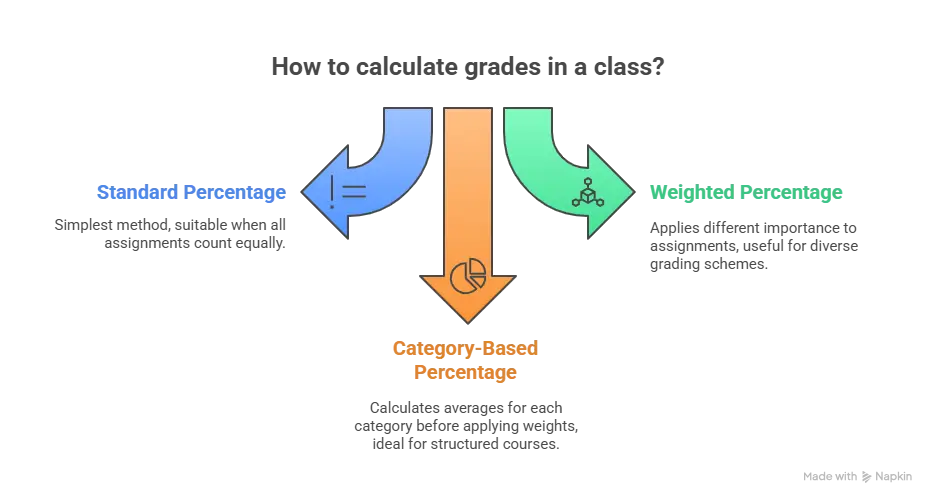
Understanding these different methods helps students calculate grade percentage accurately regardless of which system their teacher uses.
Mastering Calculate Class Percentage
Learning to calculate class percentage effectively involves regular monitoring and goal setting.
Weekly percentage checks keep students informed about their progress. Every Sunday evening (or another consistent time), students should calculate their current grade. This weekly habit provides early warnings if grades start dropping. It also shows improvement when effort increases.
Identifying trends helps students understand patterns in their performance. After tracking for several weeks, patterns emerge. Maybe grades always dip after busy sports weeks. Perhaps project scores are consistently strong while quiz scores vary. Recognizing these trends allows strategic planning.
Setting improvement goals becomes possible with clear percentage information. A student with 82% who wants an A knows they need to reach 90%. That’s an 8-point improvement. The calculator can show what scores on remaining assignments would achieve this goal. Specific targets motivate better than vague wishes for “better grades.”
To calculate class percentage that reflects true performance, update information after every single graded assignment. Don’t wait weeks between updates. Fresh data gives the most accurate picture of current standing.
Special Features in Grade Calculators
Modern grade calculators include special features that handle complex situations.
Excluding lowest scores is common when teachers drop the lowest quiz or homework grade. Good calculators let students mark which scores to exclude. The calculator automatically removes these from calculations. This feature ensures calculations match what the teacher’s gradebook shows.
Recalculating totals happens automatically when new assignments are added. Students don’t need to start over each time. Just add the new score and point value. The calculator updates everything instantly. This ongoing tracking shows grade changes in real time.
Understanding the impact of individual assignments becomes clear with calculator features. Some assignment grading tools show what grade is needed on the next test to reach a target. Others display how much each assignment category contributes to the final grade. These insights help students make smart decisions about study priorities.
Common Scenarios for Assignment Grade Calculators
Students use calculators in various situations throughout the semester.

Midterm progress checks help students assess performance halfway through the term. Calculate the current grade using all completed work. This shows whether current efforts are sufficient or if changes are needed. Midterm is the perfect time for course correction because half the semester remains.
Final exam planning relies on calculator predictions. Enter the current grade and the final exam’s weight. The calculator shows what score is needed on the final to achieve different grade goals. This information guides study intensity. If an A requires a 95% on the final, serious studying is necessary. If an 80% maintains the current grade, studying can be more relaxed.
Tips for Teachers: Setting Up Fair Grading Systems
Teachers benefit from clear grading systems that students understand.
Communicating point values clearly from day one prevents confusion. The syllabus should list every assignment type with point values or weights. Review this information during the first week of class. Post it on the classroom wall or learning platform. Clear communication means fewer grade disputes later.
Providing grade calculator resources helps students take responsibility for tracking progress. Share links to free online calculators. Show students how to use them during class. Some teachers create custom spreadsheets for their specific grading system. These resources empower students to monitor their own success.
Teachers can also use calculators to calculate my grade in a class for individual students quickly. Instead of manual calculations for each student, enter scores once and get instant results for everyone.
Tips for Students Using Assignment Grade Calculators
Following best practices helps students get the most from calculators.
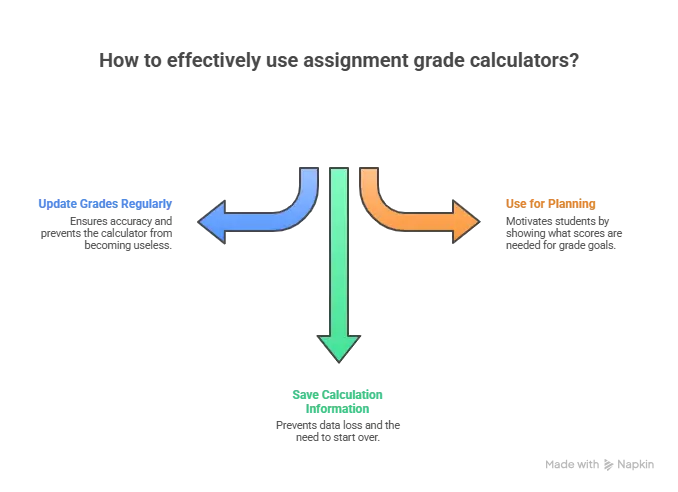
Update grades after every assignment to maintain accurate information. As soon as a teacher returns graded work, enter the score into the calculator. This habit takes 30 seconds and keeps information current. Don’t let weeks pass between updates or the calculator becomes useless.
Save your calculation information so it’s never lost. Use calculators that offer accounts where data is stored. Or maintain a backup spreadsheet with all scores. Losing grade information mid-semester means starting over from scratch. Regular backups prevent this problem.
Use the calculator for planning, not just tracking. Before big assignments, calculate what score is needed for different grade goals. This motivation helps during tough project work or test preparation.
Common Mistakes with Assignment Grade Calculations
Even with tools, students sometimes make errors.
Forgetting to include all assignments leads to incorrect calculations. Students might remember the big tests but forget smaller quizzes or homework. Before calculating, check the teacher’s grade posting system. Verify that every graded item is included in your calculator.
Using wrong point values changes the entire calculation. If a test was worth 100 points but a student enters 50 by mistake, the grade will be wrong. Double-check point values against the syllabus or assignment rubrics. Verify each entry for accuracy.
Not accounting for weights in weighted systems causes major errors. If tests count 50% and homework counts 20%, treating all assignments equally gives wrong results. Make sure to use a calculator that supports weighted calculations when needed.
Improving Your Grade Calculation Skills
Getting better at calculations takes practice and attention.

Double-check your work every time you calculate a grade. Calculate once manually. Then use an online tool. If both methods agree, the answer is likely correct. If they differ, find the mistake before trusting either result. This verification catches errors before they cause problems.
Learn from mistakes when calculations go wrong. Did you forget to multiply by 100? Did you divide in the wrong direction? Understanding what went wrong prevents repeating the same error. Keep a note of common mistakes to avoid them in the future.
Stay organized throughout semester by maintaining clear records. Use a dedicated notebook, app, or spreadsheet for grades. Record every assignment with its name, date, earned points, and possible points. Organization makes calculations easier and tracks progress clearly over time.
Practice calculations with example scenarios even when real grades aren’t available. The more calculations completed, the more natural the process becomes. Students who practice regularly can estimate their grades mentally without needing calculators for every check.
Conclusion
Assignment grade calculators are powerful tools for academic success. They help students understand current performance and plan for future improvement.
Final tips for academic success include updating grades weekly, and using grade information for strategic planning. Don’t just track grades – use them to set goals and prioritize efforts.
When students know exactly where they stand, they can make smart decisions about studying and assignments. This knowledge transforms grades from mysterious numbers into actionable information that drives improvement.
FAQs
How do you calculate final grade with points?
To calculate a final grade with points, add up all points earned across every assignment, test, quiz, and project. Then add up all possible points from those same items. Divide earned points by possible points. Multiply by 100 to get the percentage.
What’s the difference between weighted and unweighted assignment calculators?
Unweighted calculators treat all assignments equally – every point counts the same toward the final grade. Weighted calculators apply different importance levels to assignment categories.
Can I calculate my grade before the teacher posts it?
Yes, students can estimate grades immediately after completing assignments. Count points earned (or questions answered correctly) and divide by total possible points, then multiply by 100.







Great put up, very informative. I’m wondering why the opposite experts of this sector don’t notice this.
You should continue your writing. I’m sure, you have a huge readers’ base
already!