|
Getting your Trinity Audio player ready...
|
Tracking class grades throughout the semester matters for academic success. Students who monitor their grades regularly know exactly where they stand. They can identify problems early. They make better decisions about studying and assignments. Regular tracking reduces stress because there are no surprises at report card time.
This guide will help you accomplish several important goals. You’ll learn what a class grade calculator is and how to use it effectively. You’ll discover different types of calculators for various needs. You’ll master the skills needed to track progress all semester long. By the end, grade tracking will feel simple and natural.
What is a Class Grade Calculator?
A class grade calculator is a tool that helps students figure out their current grades and predict future grades. It does the math automatically when students enter their assignment scores. Within seconds, it shows the current grade percentage and letter grade.
For students, these calculators are essential tools for monitoring performance. They provide clear information about academic standing at any time. No more waiting for teachers to update online gradebooks. Students can calculate their grades immediately after completing work. This immediate feedback helps with planning and motivation.

These calculators help monitor performance by showing how assignment affects the overall class grade. After a bad test, students can see how much it hurt their grade. After a strong project, they can see the improvement. This clarity helps students understand which assignments matter most.
Benefits of regular grade tracking include better time management and improved academic outcomes. Students who check grades weekly catch problems early. They can seek extra help before it’s too late. They prioritize studying for classes where grades are slipping. This proactive approach leads to better final results.
Understanding Course Grade Calculator Tools
A course grade calculator provides several key features that make grade tracking easy and accurate.
Inputting assignment scores is simple in most calculators. Students type in the name of each assignment, the points earned, and the total points possible. Some calculators let students organize assignments by category like tests, homework, and projects. This organization mirrors how most teachers structure their gradebooks.
Automatic percentage calculations happen instantly as students enter information. The calculator divides earned points by possible points and multiplies by 100. No manual math required. If someone earned 85 out of 100 points, the calculator immediately shows 85%. This automation saves time and prevents calculation errors.
Real-time grade updates mean students always see current information. Add a new quiz score and watch the overall grade change instantly. Remove a score that hasn’t been graded yet and see how that affects the total. This dynamic updating helps students understand exactly how their grade stands right now.
Using a Class Calculator for Quick Results
A class calculator focuses on speed and simplicity for students who need fast answers.
Easy data entry means getting started takes only seconds. Most basic calculators have just a few input fields. Enter earned points, total points, and click calculate. That’s it. No complicated forms or confusing options. The simplicity helps students use calculators quickly between classes or while studying.
Instant percentage display shows results immediately after entering information. There’s no delay or processing time. The percentage appears as soon as students finish typing. This instant feedback is perfect for quick grade checks or rapid “what-if” scenarios.

Simple interface design makes class-level grading tools accessible to everyone. Clear labels explain each input field. Buttons are obvious and easy to find. The layout is clean without distracting ads or unnecessary features. Even students who aren’t tech-savvy can use these calculators confidently.
These simple calculators work great for classes with straightforward grading. All assignments worth the same percentage. Just points earned divided by points possible. When things get more complicated with weighted categories, students need more advanced tools.
Mastering the Current Grade Calculator
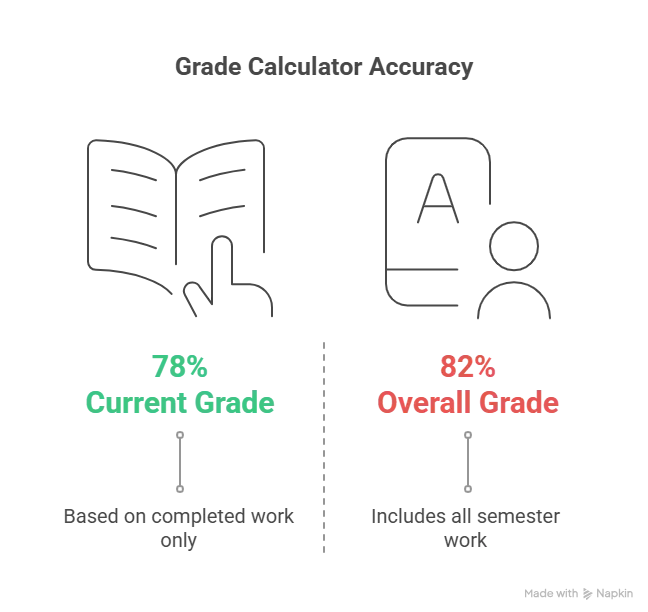
A current grade calculator shows academic standing based on completed work only. It answers the question: “What’s my grade right now with the assignments I’ve finished?”
Entering only finished assignments is crucial for accurate current grade calculations. Don’t include upcoming tests or projects that haven’t been graded yet. Only type in scores that are already posted. This gives a true picture of present performance without speculation about future work.
Getting accurate present performance helps students make informed decisions. If the current grade calculator shows a 78% with half the semester done, the student knows they’re currently at a C+. This knowledge drives action. Maybe they need tutoring. Maybe they should spend more time on homework. The current grade provides a reality check.
Planning remaining semester work becomes possible when students know their current standing. The calculator can show what scores are needed on remaining assignments to reach grade goals. If someone has a 78% and wants an 85% by semester’s end, they can calculate what average they need on future work. This planning transforms vague hopes into specific targets.
Planning with an Overall Grade Calculator
An overall grade calculator takes a bigger picture view by including all semester work – completed and upcoming.
Identifying weak areas becomes clear when looking at overall performance by category. Maybe test scores average 75% while homework averages 95%. The overall calculator shows this imbalance. Students can focus extra study time on test preparation since that’s where improvement is needed most.
Setting improvement goals works best with concrete numbers. The overall grade calculator shows current performance and what’s possible with strong effort. If someone has a 82% overall and wants a 90%, the calculator reveals exactly what scores are needed on remaining assignments. These specific targets are more motivating than vague goals like “do better.”
Step-by-Step: How to Calculate Class Grade
Learning to calculate class grade using various tools gives students flexibility and confidence.
Online calculator options are plentiful and free. Websites like RapidTables, Calculator.net, and Omni Calculator offer grade calculators. Students visit these sites, enter their scores, and get instant results. No download or installation required. These web-based tools work on any device with internet access.
Mobile app features bring grade calculation to smartphones. Apps like “My Study Life” and “Grade Calculator” install in seconds. They save student information for future updates. Push notifications can remind students to check grades regularly. The convenience of phone apps means grade tracking happens anywhere, anytime.
School platform tools often include built-in calculators. Canvas, Schoology, Google Classroom, and PowerSchool show current grades automatically. These sync with teacher gradebooks for perfect accuracy. Students should check their school’s learning management system first since it reflects official grades.
Understanding Class Average Calculator
A class average calculator helps students understand performance across multiple assignments or categories.

Calculating average across assignments involves adding all assignment scores and dividing by the number of assignments. For example, if quiz scores are 85, 90, 78, 92, and 88, add them (433) and divide by 5. The average is 86.6%. This simple average shows typical performance in that category.
Understanding category averages helps when teachers organize grades into groups. Tests might be one category. Homework another. Projects a third. The class average calculator for grades finds the average for each category separately. This organization shows where students excel and where they struggle.
Overall class average calculation combines all categories into one final number. If categories are weighted equally, just average the category averages. If categories have different weights, multiply each category average by its weight, add them, and divide by total weight. The result is the overall class average.
Mastering Class Percentage Calculator
A class percentage calculator converts points into percentages that show performance clearly.
Standard percentage formula is simple: (Earned Points ÷ Total Points) × 100 = Percentage. This formula works every time regardless of how many points are involved. Whether calculating one assignment or an entire semester, the process stays the same.
Quick conversion methods help students estimate percentages mentally. Divide earned by total to get a decimal. Move the decimal point two places right for the percentage. On a 50-point test with 42 points earned: 42 ÷ 50 = 0.84 = 84%. With practice, these conversions become automatic.
Understanding percentage ranges helps interpret what scores mean:
- 90-100% = A (Excellent)
- 80-89% = B (Good)
- 70-79% = C (Average)
- 60-69% = D (Below Average)
- Below 60% = F (Failing)
Using a class percentage calculator regularly keeps students informed about their letter grade standing. Seeing percentages converted to letters makes academic performance more concrete and understandable.
GPA Tracking: Class GPA Calculator Weighted
A class gpa calculator weighted converts letter grades to GPA points while accounting for class difficulty.

Converting grades to GPA uses a standard scale:
- A = 4.0
- B = 3.0
- C = 2.0
- D = 1.0
- F = 0.0
Some schools add plus/minus grades with intermediate values like A- = 3.7 or B+ = 3.3.
Entering letter grades requires knowing current standing in each class. Use percentage calculators to find letter grades first. Then enter those letters into the class gpa calculator weighted tool.
Applying credit hours matters because not all classes count equally toward GPA. A 3-credit class influences GPA more than a 1-credit class. Multiply each class’s GPA points by its credit hours. Add all products. Divide by total credit hours. The result is the semester GPA.
Calculating semester GPA example:
- English (3 credits, A = 4.0): 4.0 × 3 = 12
- Math (4 credits, B = 3.0): 3.0 × 4 = 12
- History (3 credits, A = 4.0): 4.0 × 3 = 12
- Science (4 credits, B+ = 3.3): 3.3 × 4 = 13.2
- Total: 49.2 ÷ 14 credits = 3.51 GPA
College-Specific: Class Grade Calculator College
A class grade calculator college addresses unique aspects of college-level grading.
How college grading differs from high school includes stricter standards, fewer assignments, and higher stakes. College professors might base entire grades on just 3 exams and a final paper. Each assignment carries enormous weight. One bad test can significantly hurt the final grade.
Different weighting systems in college often emphasize major assessments. A typical college class might weight:
- Midterm exam: 30%
- Final exam: 40%
- Research paper: 20%
- Participation: 10%
Notice how two exams account for 70% of the grade. This heavy weighting means test performance is critical.
Credit hour calculations vary by class. Most college classes are 3-4 credit hours. Labs might be 1 credit. Seminars could be 2 credits. These credit hours affect how much each class influences overall GPA. A bad grade in a 4-credit class hurts more than the same grade in a 1-credit class.
Cumulative GPA tracking across multiple semesters requires careful record-keeping. The cumulative GPA includes all semesters together. Calculate by multiplying each semester’s GPA by its credit hours, adding all products, and dividing by total credit hours. This number appears on transcripts and matters for graduation, honors, and graduate school applications.
Common Scenarios for Class Grade Calculators
Students use calculators in various situations throughout the semester.

Mid-semester progress assessment helps students evaluate their standing halfway through the term. Calculate grades using all completed work. This checkpoint identifies problems while there’s still time for correction. Half the semester remains for improvement.
Planning grade improvements requires knowing current standing and setting targets. A class overall grade calculator can show what’s needed. If someone wants to improve from a C to a B, the calculator reveals the required performance on remaining assignments.
Tips for Students Using Class Grade Calculators
Following best practices maximizes calculator effectiveness.
Update grades after every assignment to maintain accuracy. Don’t wait weeks between updates. Fresh information provides the most useful insights for planning and decision-making.
Verify against official gradebooks regularly. Calculators are only as accurate as the information entered. Compare calculator results with what teachers post officially. Discrepancies might indicate data entry errors or misunderstanding of the grading system.
Check calculations with multiple tools for verification. Use an online calculator and a mobile app. If both show the same grade, it’s probably correct. Differences signal errors that need investigation.
Improving Your Grade Tracking Skills
Getting better at grade management takes practice and good habits.
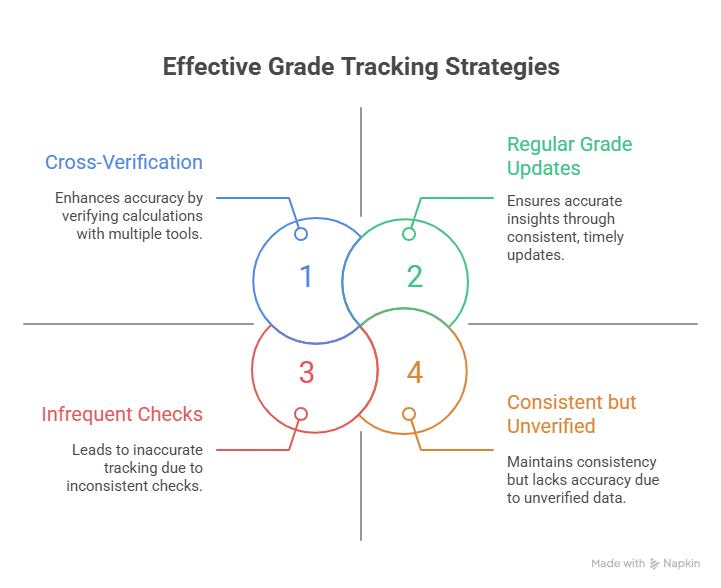
Develop consistent checking habits by setting a regular schedule. Maybe every Sunday evening, students calculate all their grades. This weekly ritual keeps information current and problems get caught early.
Learn your school’s grading system thoroughly. Read the student handbook. Understand how grades are calculated. Know the percentage ranges for each letter grade. This knowledge prevents confusion and enables accurate self-calculation.
Double-check calculations always. Never trust a single calculation without verification. Do the math twice. Use two different calculators. Compare with official gradebooks. This thoroughness prevents errors from influencing decisions.
Stay organized all semester with dedicated grade tracking tools. Don’t rely on memory or scattered papers. Use a system from day one and maintain it until the final grade is posted. Organization makes tracking effortless instead of overwhelming.
Conclusion
Final tips for academic success include staying organized, understanding the grading system, and using grade information for decision-making. Grades aren’t mysterious numbers – they’re calculable results of effort and performance. With the right tools and habits, every student can master grade tracking and use it to achieve academic goals.
FAQs
How do you calculate your current grade in a class?
To calculate your current grade, add up all points earned on completed assignments. Then add up all possible points from those same assignments. Divide earned points by possible points. Multiply by 100 to get the percentage.
What’s the difference between current grade and overall grade calculators?
A current grade calculator shows standing based only on completed work. An overall grade calculator includes both completed work and predictions for remaining assignments.
Can I use a class grade calculator for weighted grades?
Yes, many calculators handle weighted grades where different categories count for different percentages.
How do class grade calculators work for college courses?
A class grade calculator tool works similarly to high school calculators but accommodates college-specific features. College calculators often handle credit hours for GPA calculations.