
|
Getting your Trinity Audio player ready...
|
Weighted grades play a big role in modern education. They help show which assignments matter most for final grades. A big test might count for 40% of a grade while homework only counts 10%. This system rewards students for doing well on important assignments.
Many students struggle with grade calculations when weights are involved. The math can get confusing quickly. Students need to multiply scores by weights, add everything up, and divide correctly. One small mistake can give the wrong answer. This causes stress and wastes valuable study time.
This guide makes the process simple and clear. Students will learn how weighted grading works. They’ll discover helpful calculator tools. By the end, anyone can figure out their weighted grades quickly and accurately.

What is a Weighted Grade Calculator?
A weighted grade calculator is a tool that does the math for weighted grading systems. Students enter their scores and the weight of each assignment. The calculator multiplies and adds everything automatically. Within seconds, it shows the final grade.
Schools use weighted calculations to make grading fair. Not all assignments should count the same. A major research paper takes weeks of work. It should matter more than a quick 10-minute quiz. Weighting gives important assignments bigger impact on final grades.
The benefits help both students and teachers. Students can track their progress accurately throughout the semester. They know exactly where they stand. Teachers save time by using calculators instead of doing complex math by hand. Everyone wins with clearer, faster grade calculations.
Understanding Calculating Grades by Weight
How Grade Weight Calculator Works
Calculating grades by weight follows a specific process. First, the calculator takes each assignment score. Then it multiplies that score by its weight percentage. Next, it adds all these weighted scores together. Finally, it divides by the total weight to get the final grade.
Here’s a simple example. Say tests are worth 60% and homework is worth 40%. A student scores 85% on tests and 95% on homework. The calculation works like this:
- Tests: 85 × 0.60 = 51
- Homework: 95 × 0.40 = 38
- Total: 51 + 38 = 89%
A grade weight calculator makes this process automatic. Students don’t need to do any math themselves.
Common Weighting Systems in Schools
Most schools weight assignments in similar ways. Tests usually count the most, often 40-50% of the grade. Projects and papers might be 20-30%. Homework typically counts less, around 10-20%. Class participation might be 5-10%.
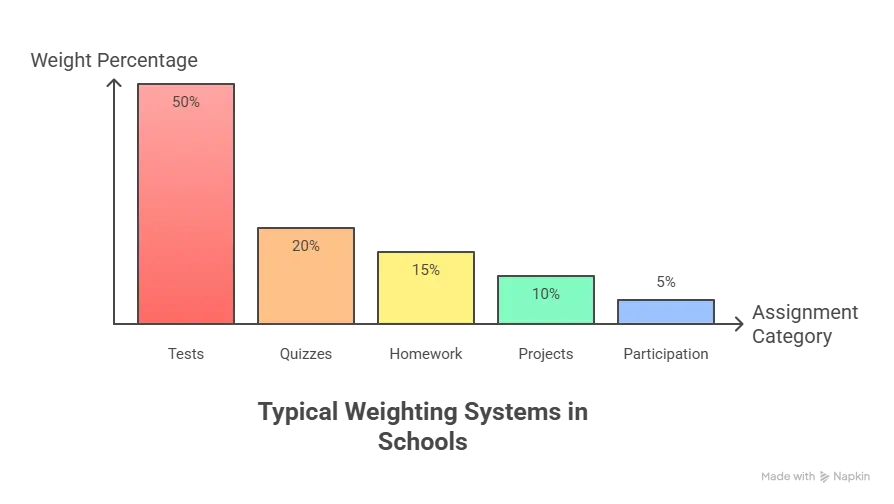
Some examples of typical weighting:
- Tests = 50%
- Quizzes = 20%
- Homework = 15%
- Projects = 10%
- Participation = 5%
Final exams often have special weight. They might count as 20-30% of the entire semester grade. Understanding these weights helps students plan their study time wisely.
Using a Grade Calculator with Weights
Step-by-Step Guide
Using a grade calculator with weights is straightforward. Follow these simple steps for accurate results.
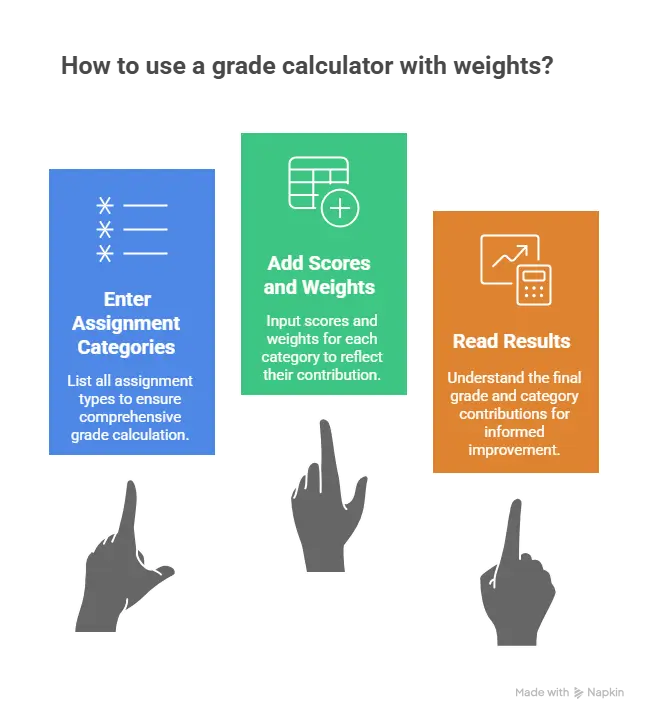
Entering Assignment Categories:
Start by listing each type of assignment. Type in categories like “Tests,” “Homework,” “Projects,” and “Quizzes.” Make sure to include everything that counts toward the final grade.
Adding Scores and Weights:
Next, enter the score for each category. If someone averaged 85% on tests, type 85. Then add the weight percentage. If tests count for 50%, enter 50 or 0.50 depending on the calculator.
Reading Your Results:
The calculator shows the final weighted grade instantly. Most tools also display how each category contributed. This helps students see which areas are helping or hurting their grade.
Benefits of Grade Calculator Weighted Tools
Grade calculator weighted tools offer major advantages for busy students.
Time-Saving Advantages:
Manual calculations can take 10-15 minutes. Calculators give answers in seconds. Students can check their grades multiple times throughout the semester without wasting study time.
Accuracy Improvements:
Calculators eliminate human error. No more mistakes with decimal points or forgotten steps. The answer is always correct when the right information is entered.
Stress Reduction for Students:
Knowing the exact grade reduces anxiety. Students don’t have to guess or worry about their standing. Clear information helps them focus on improvement instead of uncertainty.
Popular Weighted Grades Calculator Options
Best Grades Calculator Weighted Features
The best grades calculator weighted tools share important features. Look for calculators with clear input fields for each category. Good tools let students save their information for later updates. The ability to add or remove categories is helpful when class requirements change.
Top features include:
- Clean, easy-to-read interface
- Mobile phone compatibility
- “What-if” scenarios to predict future grades
- GPA conversion options
- Printable results
- No login required for basic use
User-friendly calculators explain each step. They show not just the final answer but how it was calculated. This helps students learn while tracking grades.
Finding the Right Grading Calculator with Weights
When looking for a grading calculator with weights, students should consider several factors. Free calculators work great for basic needs. Paid versions might offer extra features like progress tracking over multiple semesters.

Essential features every good calculator needs:
- Support for percentage weights
- Ability to handle 5-10 different categories
- Clear error messages if something is entered wrong
- Works on phones, tablets, and computers
- No annoying ads blocking the interface
Reliability matters most. The calculator should give consistent results. Students can test reliability by checking the same grade on two different calculators. If both give the same answer, they’re probably accurate.
How to Calculate Grades with Weights Manually
Basic Formula Explained
Learning how to calculate grades with weights manually builds understanding. The formula is: (Score1 × Weight1) + (Score2 × Weight2) + … ÷ Total Weight
Let’s break this down step by step:
- Multiply each score by its weight
- Add all those products together
- Divide by the sum of all weights
Example with three categories:
- Test (50% weight): 90 × 0.50 = 45
- Homework (30% weight): 85 × 0.30 = 25.5
- Quiz (20% weight): 80 × 0.20 = 16
- Add them: 45 + 25.5 + 16 = 86.5
- Final grade = 86.5%
Practice with a few examples makes the process clearer. Once students understand the math, they appreciate how calculators save time.
Using a Grades Calculator with Weights
A grades calculator with weights simplifies the entire process. Students can verify their manual calculations using a calculator. This double-checking catches any mistakes before they cause problems.
When to use calculators versus doing manual math depends on the situation. For quick checks during class, mental math might work. For accurate grade tracking and planning, calculators are better. They’re especially helpful when dealing with many categories or complex weighting systems.

Common calculation mistakes include forgetting to convert percentages to decimals. Another error is adding weights that don’t total 100%. Calculators prevent these problems by handling the technical details automatically.
Final Grade Calculator Weighted Systems
Planning Your Final Grade
A final grade calculator weighted helps students plan for end-of-semester success. These calculators show what score is needed on the final exam to reach a target grade. This information guides study priorities.
How final exams affect overall grades depends on their weight. If the final counts 20% and a student has an 85% average going in, they need to maintain around 85% on the final to keep that grade. Scoring higher boosts the overall grade. Scoring lower brings it down.
“What-if” scenarios help students set realistic goals. They can ask: “What if I get a 90% on the final?” The calculator shows the resulting semester grade. This planning tool reduces surprises and anxiety.
Predicting Semester Outcomes
Students can use a final grade calculator with weights to project their final results. By entering current grades and anticipated scores on remaining assignments, they see likely outcomes.
Calculating needed scores on finals works backward. Students enter their desired final grade. The calculator shows what final exam score is required. Sometimes the needed score is unrealistic (like 120%). This tells students their target grade might not be possible.
Grade improvement strategies become clear with calculators. If someone needs a 95% on the final to get an A, they know intensive studying is required. If they only need 75%, they can study at a normal pace. Smart planning leads to better results.
Class Grade Calculator with Weights
Tracking Multiple Classes
A class grade calculator with weights helps students manage several courses at once. Keeping track of grades in five or six classes gets complicated. Calculator tools let students maintain separate grade sheets for each class.
Managing grades across different courses requires organization. Students should update their calculator after each graded assignment. Weekly check-ins show trends early. If one class is slipping, extra attention can fix the problem before it’s too late.

Comparing weighted versus unweighted GPAs matters for college applications. Some schools report both numbers. Weighted GPAs give bonus points for honors and AP classes. A weighted calculator for grades shows both versions so students understand how colleges will see their performance.
Using a Weighted Calculator for Grades
Different subjects often have different weighting systems. Math classes might weight tests heavily. English classes might emphasize papers and projects. A good weighted calculator for grades adapts to any system.
Honors and AP courses sometimes use weighted scales where an A equals 5.0 instead of 4.0. Regular classes max out at 4.0. This affects overall GPA calculations. Students taking challenging courses benefit from weighted grading.
The overall GPA impact depends on how many weighted classes a student takes. Someone with three AP classes and three regular classes will have a GPA between 4.0 and 5.0. Calculators show exactly where the GPA falls.
GPA Calculator with Weighted Grades
Converting Weighted Grades to GPA
A gpa calculator with weighted grades converts letter grades to the 4.0 scale while accounting for course difficulty. Regular classes use standard conversion: A=4.0, B=3.0, C=2.0, D=1.0, F=0. Weighted classes add bonus points.
Understanding GPA scales helps students track college readiness. Most colleges want to see GPAs above 3.0. Competitive schools look for 3.5 or higher. Knowing the current GPA helps students set appropriate college goals.
Weighted versus unweighted GPA makes a significant difference. A student with straight As in all regular classes has a 4.0 unweighted GPA. The same student taking all AP classes might have a 4.5 weighted GPA. Both numbers tell part of the story.
Using a Calculator for Weighted Grades
A calculator for weighted grades streamlines GPA calculations across multiple semesters. Students enter grades from freshman through senior year. The tool calculates cumulative GPA automatically.
Semester GPA calculations show performance in individual terms. This helps identify strong and weak semesters. Patterns emerge that guide future planning.
Cumulative GPA tracking adds up all semesters together. This number appears on transcripts and college applications. Regular updates keep students informed about their standing.
Grade point conversions vary slightly between schools. Some use plus/minus grades with different point values. A good calculator lets students customize the conversion scale to match their school’s system.
How to Calculate Weighted Average for Grades
The Complete Formula
Understanding how to calculate weighted average for grades starts with the basic formula. The weighted average equals the sum of (each score × its weight) divided by the total of all weights.

Written as a formula: Weighted Average = Σ(Score × Weight) ÷ Σ(Weight)
Breaking down the weighted average formula step by step:
- List all assignment categories and their weights
- Multiply each category’s average score by its weight
- Add all those products together
- Add up all the weights
- Divide the sum of products by the sum of weights
Multiplying scores by weights gives each category its proper influence. A test worth 50% has five times the impact of homework worth 10%. The math automatically gives important work more influence on the final grade.
Using a Weighted Average Calculator for Grades
A weighted average calculator for grades automates this entire process. Students type in their information once. The calculator handles all multiplication and division instantly.
Simplifying complex calculations helps students focus on learning instead of math. When dealing with seven or eight categories, manual calculation becomes tedious and error-prone. Calculators eliminate frustration.
Handling multiple categories works the same whether there are three or ten different grade types. The calculator adjusts automatically. Students just keep adding categories as needed.
Verifying accuracy is easy with calculators. Students can double-check by trying the same calculation twice or using two different calculator tools. Matching results confirm accuracy.
Practical Tips for Calculate Grades Weighted
Best Practices for Students
Students who calculate grades weighted regularly have better academic outcomes. These practical tips help maximize success.
Regular grade monitoring means checking calculations every week or two. Don’t wait until report cards arrive. Frequent checks catch problems early when they’re easier to fix.
Understanding syllabus weights is crucial from day one. Read the course syllabus carefully. Note exactly how much each category counts. Some teachers weight participation at 5% while others don’t grade it at all.
Planning study priorities based on weights makes sense. If tests count for 60% of the grade, test preparation should get the most study time. Don’t spend hours on assignments worth only 5% while neglecting major exams.
Using a Grade Average Calculator with Weight
A grade average calculator with weight becomes more useful with proper data entry. Take time to input information carefully. Double-check that weights add up to 100%.
Inputting data correctly prevents errors. Make sure test scores go in the test category, not the homework category. Wrong placement gives inaccurate results.

Updating grades throughout the semester keeps information current. Add new scores as soon as teachers post them. Fresh data gives better predictions about final outcomes.
Identifying areas for improvement becomes obvious with weighted calculations. If homework is weighted at 20% and someone averages 70% there, that’s pulling down the overall grade. Focus improvement efforts where they’ll have the biggest impact.
Special Situations with Weighted Grading Calculator
Dropped Grades and Extra Credit
A weighted grading calculation can handle special situations with the right approach. Many teachers drop the lowest quiz or homework grade. Students need to account for this when calculating grades.
How to account for dropped assignments: Don’t include the dropped grade in calculations. If a teacher drops the lowest of five quizzes, only enter the best four. The calculator will work with whatever scores are included.
Including bonus points requires adding them to the relevant category. If a student earned 95% on tests plus 3 bonus points, enter 98% in the test category. Extra credit boosts the category average.
Adjusting weights accordingly happens when categories have different numbers of assignments. If homework usually has 10 assignments but one student missed two, the weight might need adjustment. Most calculators handle this automatically by averaging the grades entered.
Mid-Semester Grade Checks
Partial semester calculations help students track progress before finals. Enter all completed assignments with their weights. Leave future assignments blank or estimate scores to see different scenarios.
Projecting final outcomes uses current grades plus estimated future performance. If someone has an 85% average on work worth 70% of the grade, they can project what’s needed on the remaining 30%.
Course correction strategies become clear with mid-semester checks. Students falling behind can identify which categories need more attention. Early intervention prevents end-of-semester panic.
Common Mistakes
Students often make predictable errors when they calculate grades with weights. Knowing these mistakes helps avoid them.
Forgetting to convert percentages to decimals: When doing manual math, 50% must become 0.50. Multiplying by 50 instead of 0.50 gives completely wrong answers. Calculators usually accept either format, but manual calculations require decimals.
Using wrong weight values: Double-check the syllabus. If tests are 40% and someone accidentally enters 50%, the final grade will be wrong. Small mistakes in weights cause big errors in results.
Not accounting for all categories: Some students forget about participation or attendance grades. If these count for 10% of the final grade, leaving them out skews results. Include every graded category.
Tips for Teachers Using Weighted Grade Calculators
Teachers benefit from weighted grade calculators just as much as students. These tools make grade management more efficient and accurate.
Setting Up Fair Weighting Systems:
Consider how much time students spend on each assignment type. Major projects requiring weeks of work should count more than daily homework. Most teachers weight tests at 40-60%, projects at 20-30%, and homework at 10-20%.
Communicating Weights to Students:
Put weighting information in the syllabus. Review it during the first week of class. Post it on the classroom wall. Clear communication prevents confusion and disputes later.
Using Calculators for Efficient Grading:
Teachers can input scores into sheet calculators once and update them as new grades come in. This beats calculating each student’s grade by hand every week. The time savings add up quickly.
Comparing Different Weighted Grade Calculator Tools
Students and teachers have many options for calculating weighted grades. Each type of tool has advantages and disadvantages.
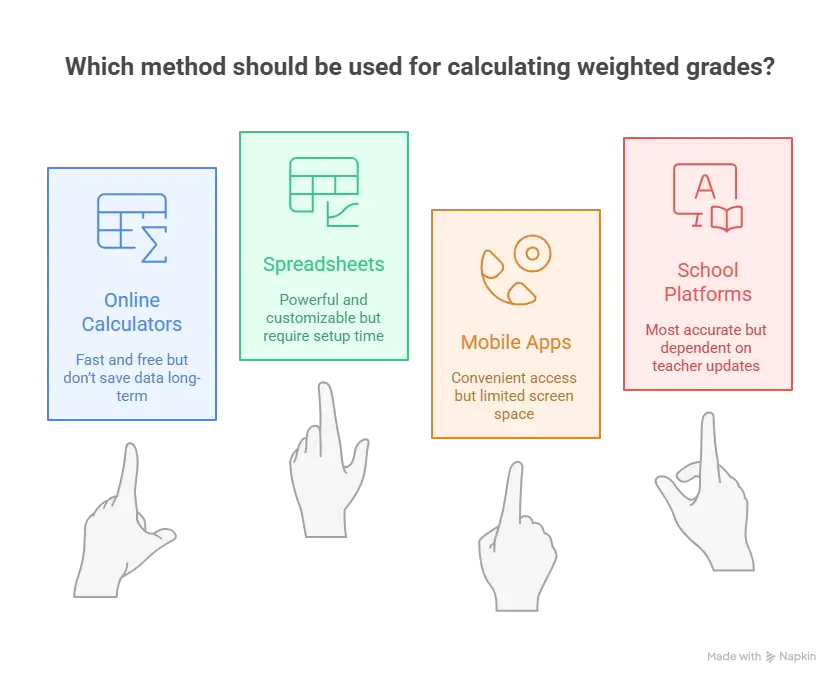
Online Calculators vs Spreadsheets:
Online calculators are simple and require no setup. Just enter scores and get results. Spreadsheets like Excel or Google Sheets offer more customization but take time to set up. Spreadsheets are better for tracking multiple classes over long periods. Online calculators work great for quick checks.
Mobile Apps for Grade Tracking:
Many free apps let students track grades on their phones. Apps like “My Study Life” or “Grade Calculator” offer weighted grade features. The advantage is having grades available anywhere. The disadvantage is smaller screens make data entry harder.
School-Specific Platforms:
Many schools use platforms like Canvas, Blackboard, or PowerSchool. These systems often have built-in weighted grade calculators. They’re the most accurate because they sync directly with teacher gradebooks. However, students can’t control when grades are posted.
Pros and Cons of Each Option:
- Online calculators: Fast and free but don’t save data long-term
- Spreadsheets: Powerful and customizable but require setup time
- Mobile apps: Convenient access but limited screen space
- School platforms: Most accurate but dependent on teacher updates
Choose the tool that best fits individual needs and preferences.
Conclusion
Weighted grading helps students and teachers measure academic performance fairly. Important assignments get the weight they deserve. Quick quizzes don’t unfairly hurt overall grades.
This guide covered everything about weighted grade calculations. Students learned how the math works. They discovered helpful calculator tools. The benefits of using these tools include saving time, improving accuracy, and reducing stress.
FAQs
What is a weighted grade calculator?
A weighted grade calculator is a tool that helps calculate final grades when different assignment types have different importance levels.
How do you calculate grades by weight?
To calculate grades by weight, first multiply each assignment category’s score by its weight percentage.
What’s the difference between weighted and unweighted grades?
Unweighted grades treat all classes equally, with A=4.0, B=3.0, etc. Weighted grades give bonus points for harder classes like honors or AP courses.
Can I calculate my final grade with weighted categories?
Yes, students can calculate final grades with weighted categories using a final grade calculator.
Are weighted grade calculators accurate?
Yes, weighted grade calculators are very accurate when correct information is entered. They use standard mathematical formulas that always produce the same results.







The example of a test counting 40% while homework is only 10% really explains why weighted grades can feel so different from a simple average. I’ve definitely had classes where one exam changed my whole standing, so using a weighted grade calculator early would’ve saved me a lot of guessing. Curious if one of your quick tips is to track each category weekly so final-grade surprises are less stressful.
Yes, tracking each category weekly is a smart move.
Since tests carry more weight, one exam can shift everything. Updating your weighted grade calculator after each major grade helps you stay in control and avoid surprises.